
Aged Care
Statements
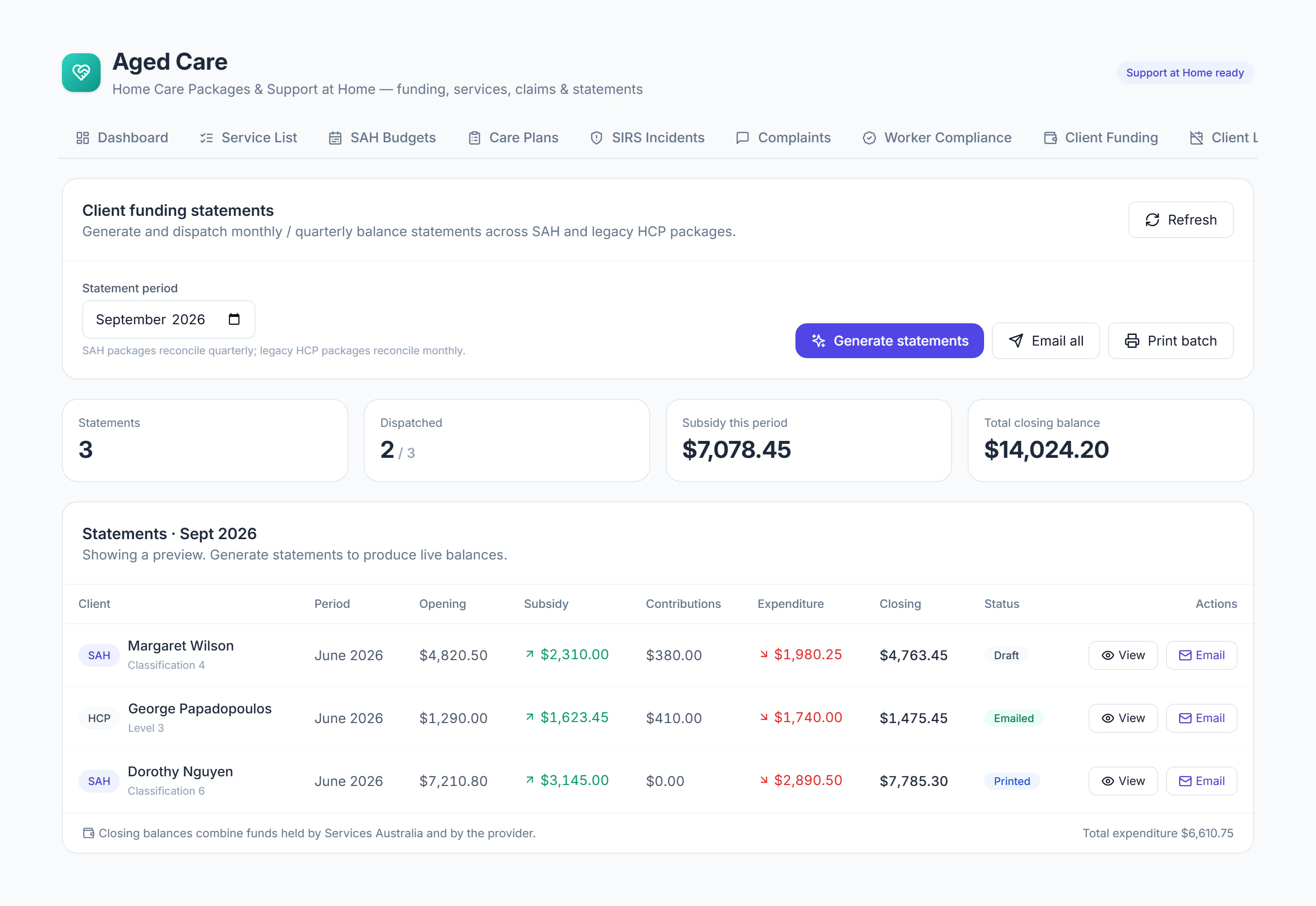
/aged-care?tab=statements7 stepsStatements produces each participant's monthly Support at Home statement: opening balance, subsidy, services delivered, contributions and closing balance. Administrators generate, check and send them, because every participant is owed one every month, even with no services.
Step by step
- 1
Generate for the period. Choose the month in the statement month picker, then select Generate statements to create one for every participant, including those with no services.

- 2
Check Months still owed to participants at the top. Each month says who has no statement yet and who has one not sent; select it to open that month.
- 3
Select a statement to open it. Check the Services delivered lines and the Statement summary, and add or remove a line if something is wrong.
- 4
Select Email all to send the month's statements, or Email on one row. Any that could not be sent are listed with the reason, such as no email address.
- 5
Select Print batch for participants who receive their statement by post, or use Print and Download PDF on an open statement.
- 6
Select Contribution invoices to draft one invoice per participant for their share of the month. Until the payment statement is imported in Claims, the amounts are estimates.
- 7
Check the figures at the top. Sent shows how many of the month's statements have gone out, and the drafted contribution invoices are in Invoices under Aged care contribution.
The screen
Did this answer your question?
If not, talk to us — we answer from Australia, in business hours.