
Support Coordination
My Day
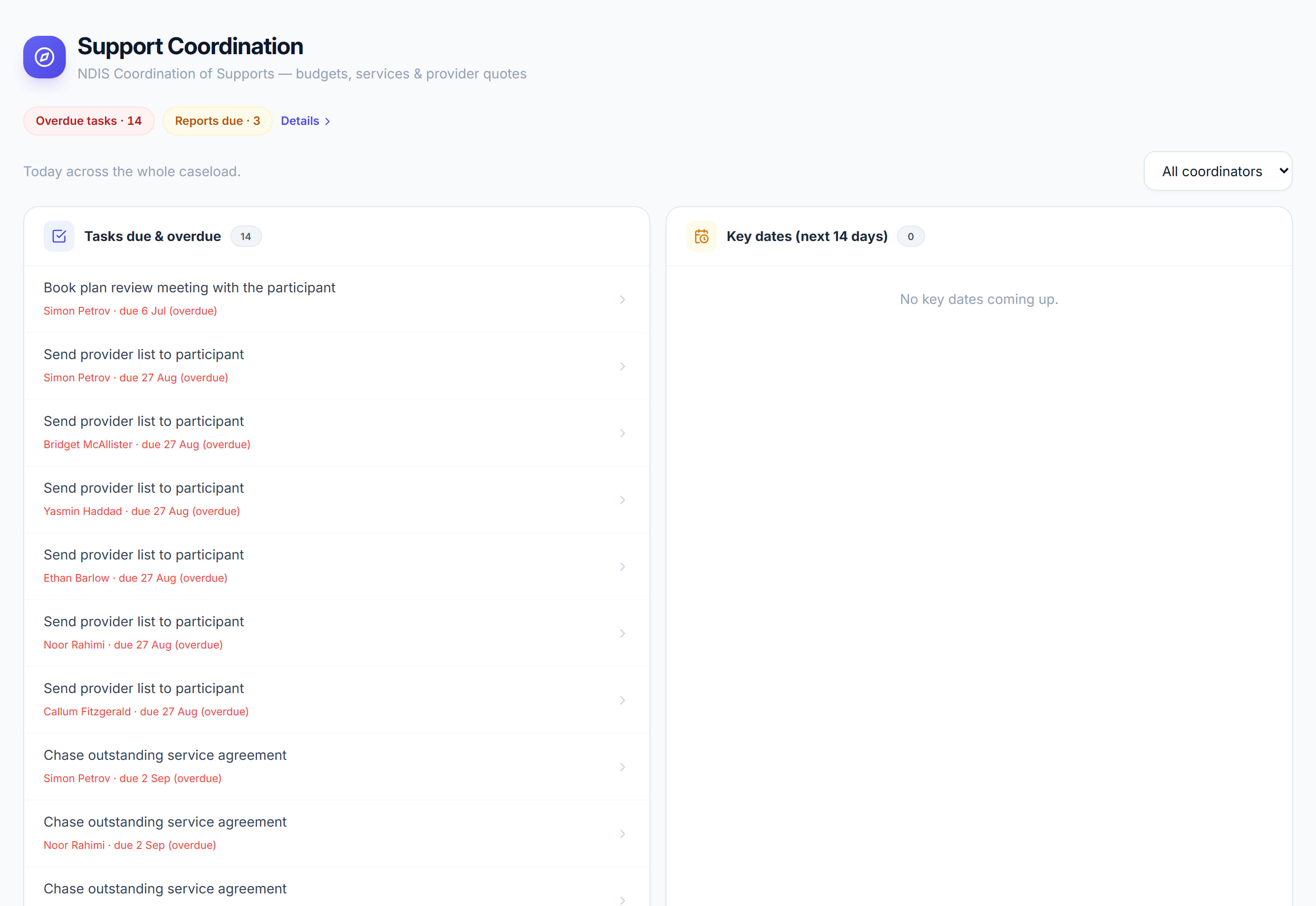
/support-coordination?view=myday6 stepsToday is a support coordinator's working screen: tasks due and overdue, key dates in the next 14 days, engagements that need a note, and recent activity across the caseload. Team leaders also use it to check each coordinator's caseload against targets.
Step by step
- 1
Work the list top to bottom. Start with Tasks due and overdue, then Key dates (next 14 days), and select any row to open that participant's file.
- 2
Log time and notes as you go rather than at the end of the week. Open each engagement under Needs a note and add a Progress note.
- 3
Choose a coordinator from All coordinators to see only their work, or leave it on the whole caseload.
- 4
Check the oversight chips at the top, such as Missing notes, Overdue tasks or Budgets at risk, and select Details to open the full lists in Insights.
- 5
Read Recent activity for the latest case notes, and select one to open the engagement it belongs to.
- 6
In Caseload capacity, set each coordinator's Caseload target and Weekly hrs target. The Load bar turns amber above 85% of the caseload target and red above 100%.
The screen
Did this answer your question?
If not, talk to us — we answer from Australia, in business hours.