
Support Coordination
Calendar
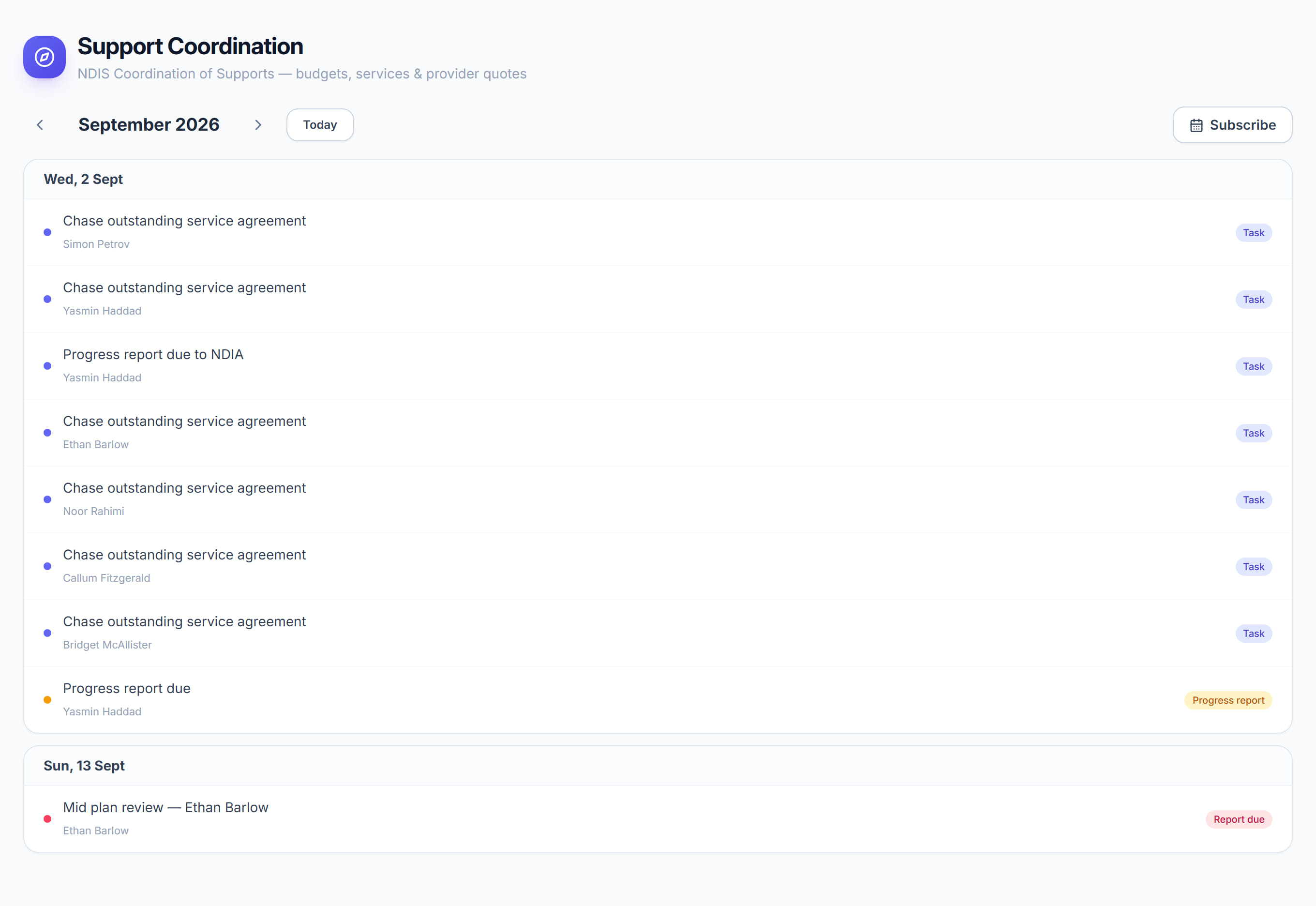
/support-coordination?view=calendar7 stepsThe Calendar lists key dates and tasks across the whole coordination caseload, month by month: plan reviews, progress reports, funding releases, reports due and tasks. Coordinators use it to plan ahead, and can subscribe to it from Google Calendar or Outlook.
Step by step
- 1
Open Calendar. It opens on this month, listing each day that has something due, with today highlighted.
- 2
Use the arrows to move to the previous or next month, and select This month to come back to today.
- 3
Read the label on each entry: Task, Plan review, Progress report, Funding release or Report due. The coloured dot also marks the type.
- 4
Select an entry to open the participant's engagement, where you can complete the task or update the date.
- 5
Select Subscribe and tick the box so the calendar feed is live, then select Copy to copy the feed URL.
- 6
In Google Calendar choose Other calendars, then From URL; in Outlook choose Add calendar, then Subscribe from web. Paste the URL and updates sync automatically.
- 7
If the link has been shared too widely, select Generate a new link in the Subscribe window, then update your calendar apps with the new URL.
The screen
Did this answer your question?
If not, talk to us — we answer from Australia, in business hours.