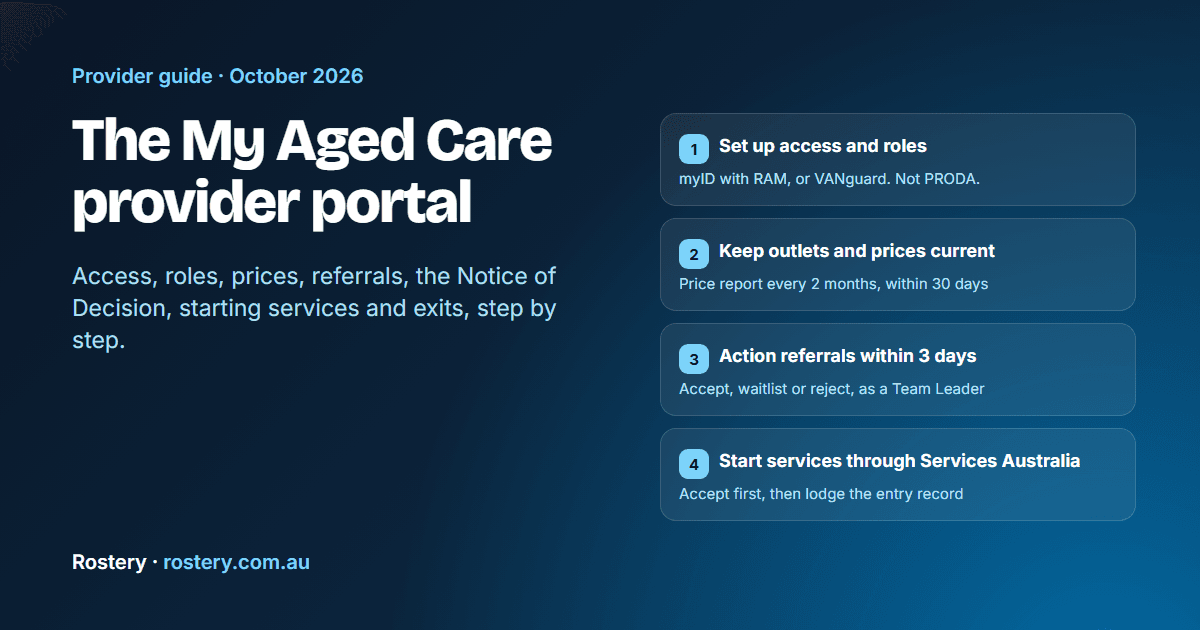
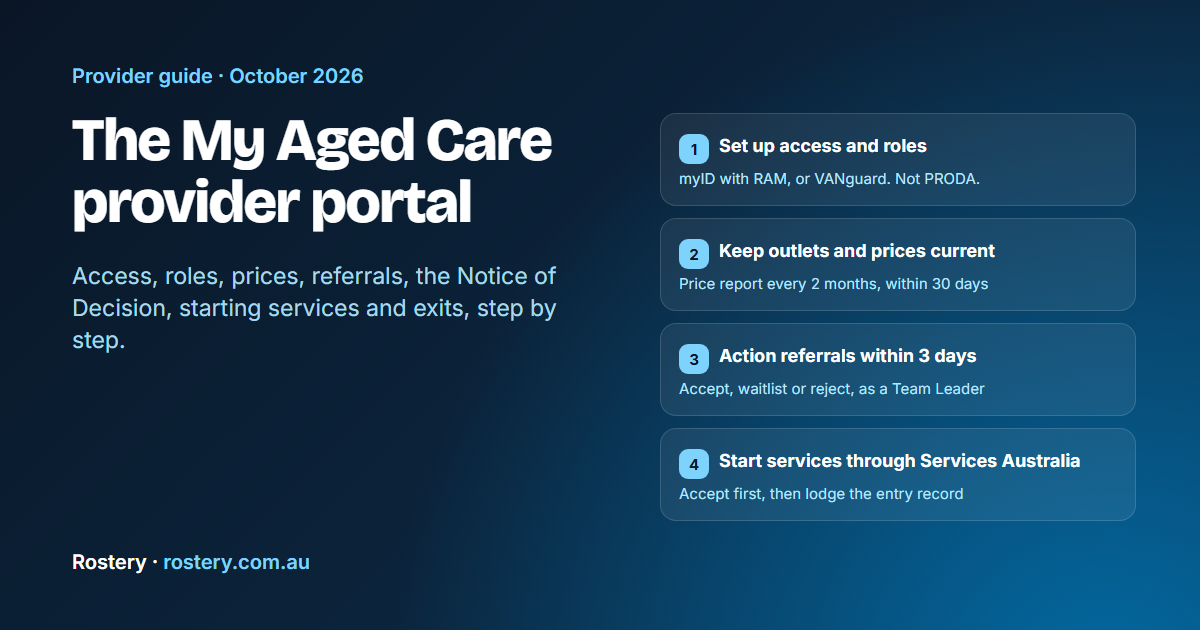
The My Aged Care provider portal is the government system where registered aged care providers manage their outlets and prices, receive and respond to referrals, read clients' assessment outcomes, ask for support plan reviews and lodge serious incident notices. Its official name is the My Aged Care Service and Support Portal, and it used to be called the Provider Portal. It is run by the Department of Health, Disability and Ageing.
Much of the confusion around it comes from the fact that it is only one of the systems a Support at Home provider uses. Claims, budgets and start notifications go through Services Australia's Aged Care Provider Portal, which has a different login. This guide walks through the My Aged Care portal from first login to a participant's exit, for intake officers, team leaders and managers of home care providers. Every rule was checked on 13 October 2026 against the department's portal user guides (June and July 2026), the Support at Home program manual V4.4 and the Aged Care Rules 2025.
The My Aged Care portal and the other provider systems
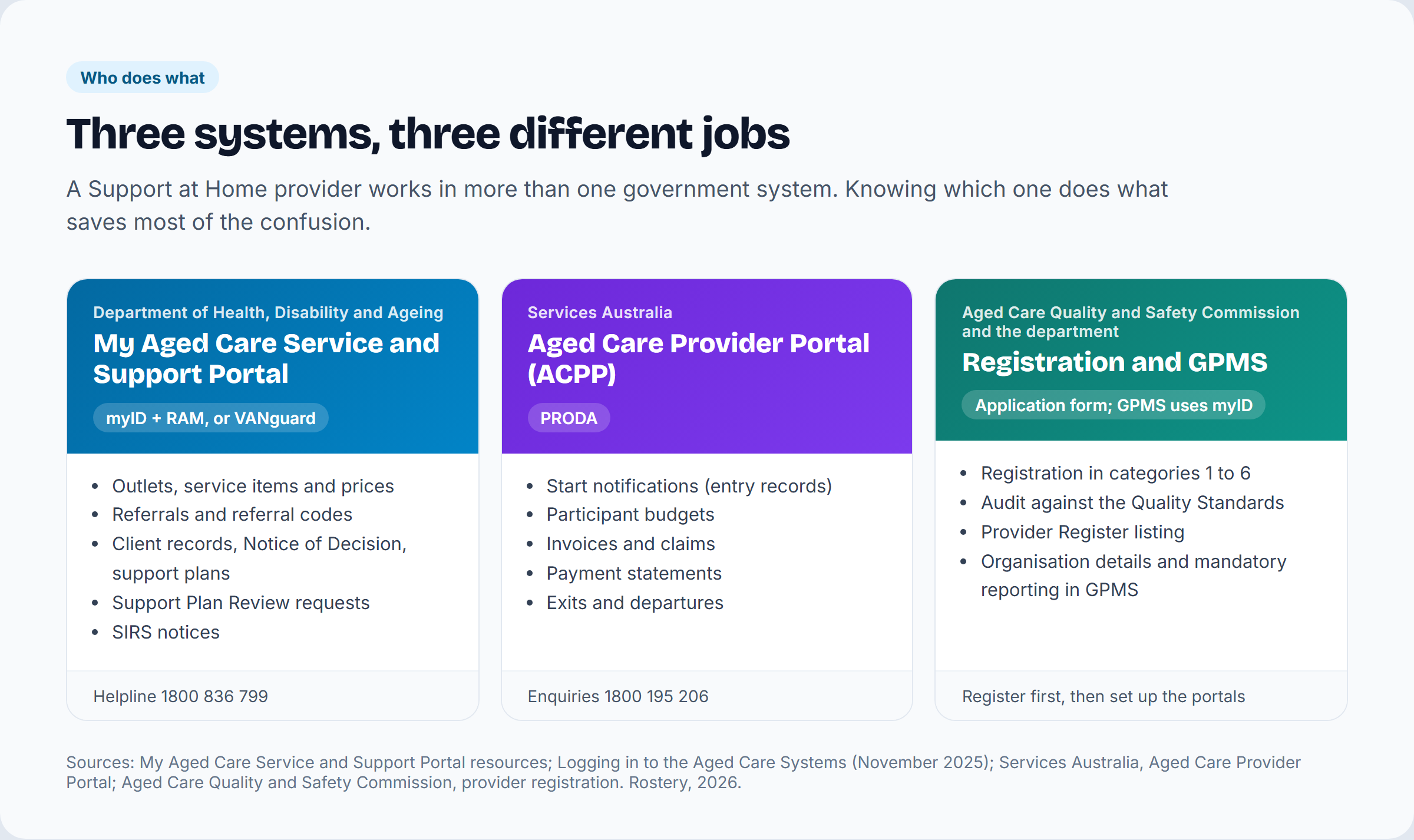
A Support at Home provider deals with three government systems. Each one does a different job and has its own login.
| System | Run by | Login | What you do there |
|---|---|---|---|
| My Aged Care Service and Support Portal | Department of Health, Disability and Ageing | myID with Relationship Authorisation Manager (RAM), or VANguard | Outlets, service items and prices; referrals; client records, Notices of Decision and support plans; Support Plan Review requests; SIRS notices |
| Aged Care Provider Portal (ACPP) | Services Australia | PRODA | Start notifications; participant budgets; invoices and claims; payment statements; exits |
| Provider registration and GPMS | Aged Care Quality and Safety Commission, and the department | Commission application form; GPMS uses myID or VANguard | Registration in categories 1 to 6; organisation details and mandatory reporting |
The department's portal page lists what providers must use it for: entering and managing information about services, managing referrals, updating client records, generating reports, and asking assessors to review a client's support plan. Residential providers also see care minutes targets there. The rest of this guide covers the parts that matter to home care providers.
Before you can use the portal: provider registration
People often search for "My Aged Care provider registration", but providers don't register with My Aged Care. Under the Aged Care Act 2024, every provider of funded aged care must be registered by the Aged Care Quality and Safety Commission. There are six registration categories. To deliver Support at Home you must be registered in Category 4, Personal and care support in the home or community, with the service type "Care management", and in Category 5 if you deliver nursing. The Commission audits applicants for categories 4, 5 and 6 against the strengthened Aged Care Quality Standards, and successful providers are listed on its Provider Register.
The department sets out the order for a new Support at Home provider:
- Register with the Aged Care Quality and Safety Commission.
- Tell the department about each service delivery branch, using the Service Delivery Branch Notification Form.
- Set up access to the My Aged Care Service and Support Portal, so you can create your organisation's profile, add your services, publish your prices and manage referrals.
- Register for the Aged Care Provider Portal with Services Australia, for online claiming.
A service delivery branch is the same thing as the NAPS Service ID that appears in both the My Aged Care portal and the Aged Care Provider Portal, and every participant must be linked to one. For the full registration steps, see the Commission's page on becoming a registered provider.
Logging in to the My Aged Care provider portal
The portal is at myagedcare-serviceproviderportal.health.gov.au. Each user logs in with one of two methods:
- myID, the government's Digital ID app, linked to your organisation through Relationship Authorisation Manager (RAM). Your myID needs Standard identity strength, which takes at least two Australian identity documents.
- VANguard Federated Authentication Services (FAS).
PRODA does not work for this portal. PRODA is for Services Australia's Aged Care Provider Portal. AUSkey and Manage ABN Connections have been retired. The same myID or VANguard login also opens the GPMS provider portals.
Since 1 October 2026, every user must accept new Terms of Use when they log in. They ban automated tools, scripts, robots and data scraping on the portal unless the department has given written permission.
Setting up users and roles
The department sets up the first Organisation Administrator account for a registered provider. To ask for it, the person who will hold the role calls the My Aged Care service provider and assessor helpline on 1800 836 799 with their name, email address, organisation name and ABN or ACN. The Organisation Administrator must be the first person from the organisation to log in. They then add other staff and give them roles.
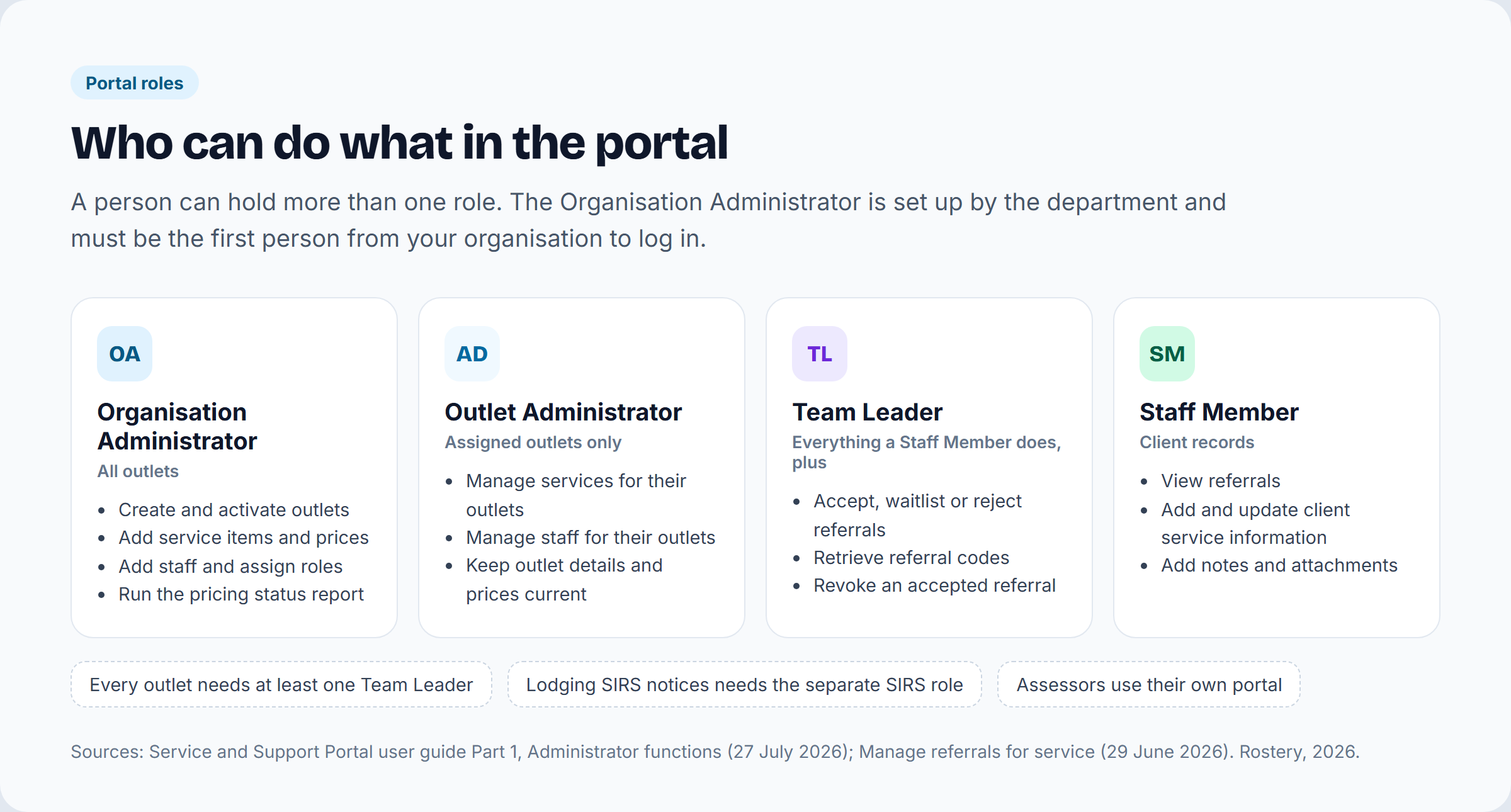
| Role | Scope | Main jobs |
|---|---|---|
| Organisation Administrator | All outlets | Create and activate outlets, add service items and prices, add staff and assign roles, manage user access in My Aged Care and GPMS |
| Outlet Administrator | The outlets they are assigned to | Manage services and staff for those outlets |
| Team Leader | Their outlets | Everything a Staff Member does, plus accepting, waitlisting, rejecting and revoking referrals |
| Staff Member | Their outlets | View referrals, and add and update client service information in the client record |
| SIRS role | Added to a user's profile | Lodge Serious Incident Response Scheme notices |
A person can hold more than one role, and every outlet needs at least one Team Leader. Assessors don't appear in your list of roles, because they work in a separate assessor portal.
Setting up outlets, services and prices
Each outlet you create starts as Inactive. An Administrator has to activate it and add service items before it can take referrals. What you enter here is shown publicly in the Find a provider tool on the My Aged Care website, and the contact centre and assessors use it to send referrals, so wrong details mean missed or wrong referrals. The service delivery area matters most, because it decides which referrals and location searches find you.
The department's checklist for every operational Support at Home outlet is:
- check every active service item
- mark any service you don't offer as Offline
- enter your standard business hours price, which is mandatory
- check that your service delivery area is right
- confirm your outlet names and descriptions.
Reporting your Support at Home prices
Section 166-1005 of the Aged Care Rules 2025 requires you to report your most frequently charged price, for standard business hours, for each of 12 service types: allied health and therapy, care management, domestic assistance, home maintenance and repairs, home or community general respite, meals, nursing care, personal care, restorative care management, social support and community engagement, therapeutic services for independent living, and transport. You report every 2 months, within 30 days after the period ends. You don't need to report a service you haven't delivered in the last 12 months.
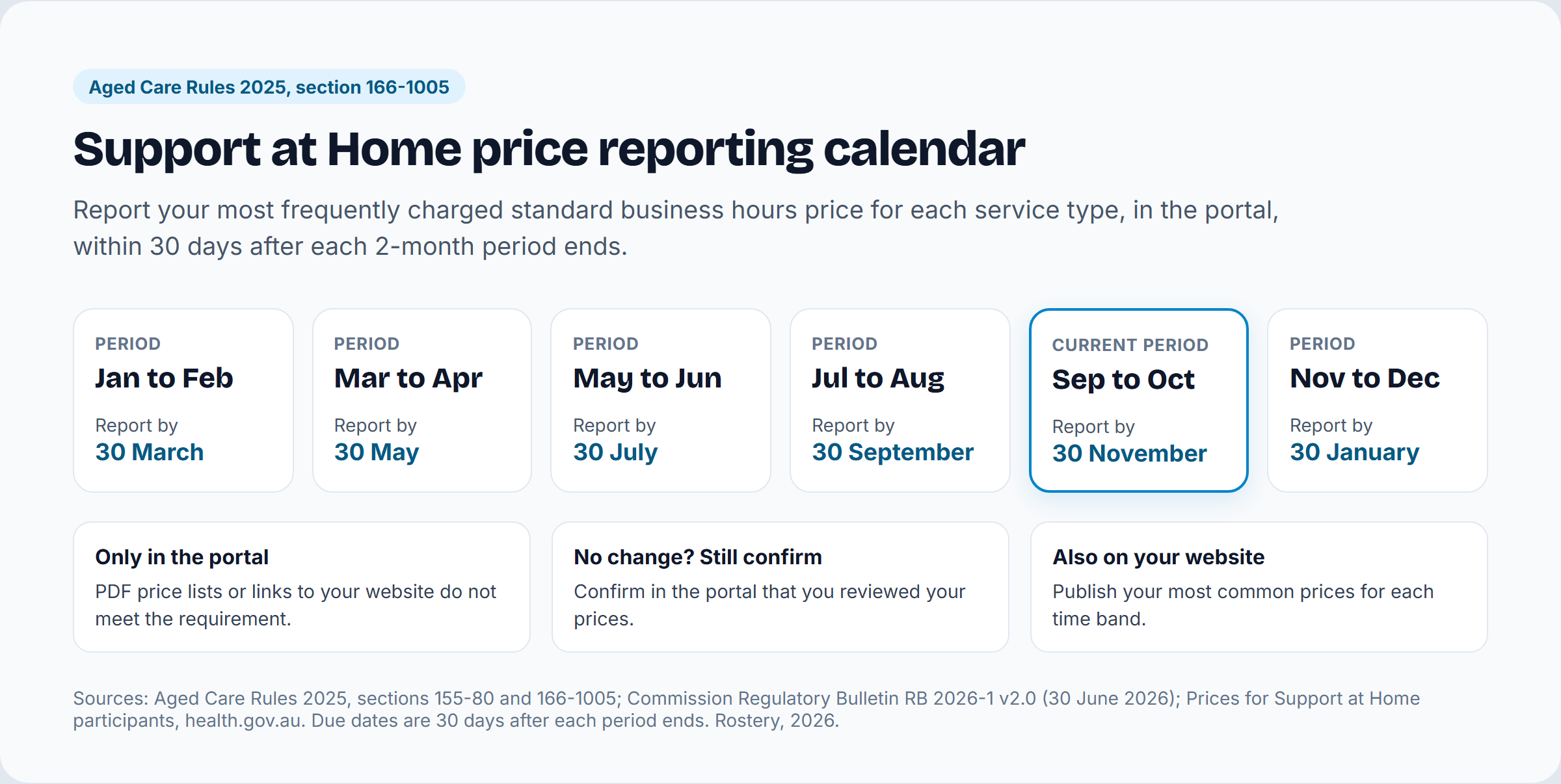
| Reporting period | Report by |
|---|---|
| 1 January to end of February | 30 March |
| 1 March to 30 April | 30 May |
| 1 May to 30 June | 30 July |
| 1 July to 31 August | 30 September |
| 1 September to 31 October | 30 November |
| 1 November to 31 December | 30 January |
The portal is the only accepted way to report. A PDF price list or a link to your website does not count. If nothing has changed, you still confirm in the portal that you reviewed your prices. Without Support at Home prices, a service item can't be saved or made operational, and My Aged Care's Fee Estimator gets no pricing data for you. Administrators can run the Support at Home Pricing Status report to find services with missing or old prices. The report's data runs about 24 hours behind what you enter.
Section 155-80 of the Rules also requires you to publish your most common price for each service on your own website, for standard business hours, weekdays outside those hours, Saturdays and the later time bands. The Commission explains both duties in Regulatory Bulletin RB 2026-1, Support at Home pricing requirements (version 2.0, 30 June 2026). The department can refer a provider that doesn't report its prices properly to the Commission.
In May 2026 the Government paused its plan for Support at Home price caps. Instead, the Commission can order refunds when a provider overcharges, and a National Summary of Support at Home Prices is published every quarter. Some older My Aged Care pages still say caps start on 1 July 2026, so check the date on any page you rely on.
My Aged Care referrals: how they arrive and how to respond
The department's referrals guide lists four ways a referral can reach you:
- a client with an existing approval comes to you directly
- an electronic referral arrives in the portal
- a client gives you a referral code from an assessor or the My Aged Care contact centre
- an electronic referral to your waitlist, if you have turned the waitlist on.
For Support at Home, referrals are usually issued as a referral code, and only once funding has been assigned to the person. The program manual describes two routes: a referral created by the contact centre, an Aged Care Specialist Officer or an assessor, or a direct referral where the person gives you their code.
Retrieving a referral code
- A Team Leader selects Retrieve a referral code on the portal home page.
- They enter the client's referral code and choose the outlet that will deliver the services.
- The referral appears in Incoming referrals, ready to accept, waitlist or reject.
Checking before you accept
Before accepting, open View referral summary and client record. It shows the referral, the client's assessment and its outcomes. Check the client record for active services too. The program manual says not to commit to services while the person is receiving in-home or residential aged care from another provider, until that provider's cessation date is confirmed. Accept only when you have the capacity to deliver the services and the client has agreed to go ahead. The client's full address and contact details appear after you accept, in the Accepted services pending tab.
The 3-day response time
The department's guide to managing referrals (29 June 2026) says providers must accept, reject or waitlist an electronic referral within 3 calendar days of receiving it. Overdue referrals are flagged in the Team Leader's incoming referrals tab, an email goes to the outlet's email address, and an Overdue referral task appears in Tasks and notifications. Only Team Leaders can action referrals, so make sure one is always available at every outlet.
Rejecting, waitlisting and revoking
To reject a referral you choose a reason from a list. Assessors can see the reason, but the client can't see it in their Online Account. Waitlisting only works if an Administrator has turned on the waitlist for that service. A client can sit on several providers' waitlists at once, and when one provider draws them into service, they come off the others.
For Support at Home, be careful with waitlists. Putting a participant on a waitlist doesn't pause their take-up deadline. If the deadline passes while they are waitlisted, the funding lapses and is withdrawn automatically, which is why the department tells providers to avoid waitlisting people whose funding has been allocated.
You can revoke an accepted referral only before you have entered service information or started services. The department monitors this and notifies outlets that revoke 20% or more of their referrals over 12 months. When you revoke, the system issues other referrals automatically.
Reading the Notice of Decision and approvals
An Assessment Delegate makes the approval decision, and the assessment organisation sends the person a Notice of Decision, formally titled "Outcome of your application for government-funded aged care services". It sets out the approved services, including the classification level, any assistive technology and home modifications (AT-HM) tier and any short-term pathway, with the reasons for the decision and the person's review rights. Our glossary entry on the Notice of Decision gives the short version.
In the portal's client record you will find:
- Notice of Decision letters under Attachments
- a read-only copy of the support plan, and earlier screenings and assessments, under Plans
- approved classifications and short-term pathways, pending and assigned funding, the approval start and stop dates, and the take-up deadline, under Approvals.
Priority, waits and interim funding
People approved for ongoing Support at Home services enter the Support at Home Priority System in one of four categories. The Integrated Assessment Tool gives points for urgency: 5 or more points is urgent, 4 is high, 2 to 3 is medium and 0 to 1 is standard. A diagnosis of motor neurone disease alone scores 5. Nobody receives government-funded ongoing services until their funding has been allocated.
| Priority category | Estimated wait (My Aged Care, 30 June 2026) |
|---|---|
| Urgent | Within 1 month |
| High | 1 month |
| Medium | 5 to 6 months |
| Standard | 7 to 8 months |
The department's wait times report for April to June 2026 put the median time from application to the start of ongoing Support at Home services at 297 days, the longest of any service type. The End-of-Life Pathway had the shortest, at 14 days.
When demand is high, a person may receive interim funding of 60% of their classification. The portal shows this as "MSO", short for minimum service offer, in the "place assigned" field on the Referral and Approvals pages. When full funding is assigned, you get a portal notification that the "participant receiving MSO is assigned FSO".
The take-up deadline
Once funding is allocated, the participant has 56 calendar days to sign a service agreement and start services. A 28-day extension from My Aged Care makes it 84 days. If services haven't started by then, the funding is withdrawn and the person leaves the Priority System, although they keep their original approval date if they rejoin. Your start notification to Services Australia has to be lodged inside the same window.
The manual counts the 56 days from the date funding was allocated, while some My Aged Care pages count from the date on the person's letter. The simplest way to avoid a dispute is to work from the take-up deadline shown on the Approvals tab. For Restorative Care Pathway and End-of-Life Pathway referrals the portal doesn't show a take-up deadline, so check the "Take up end date" in Services Australia's systems instead.
Starting services: from accepted referral to services in place
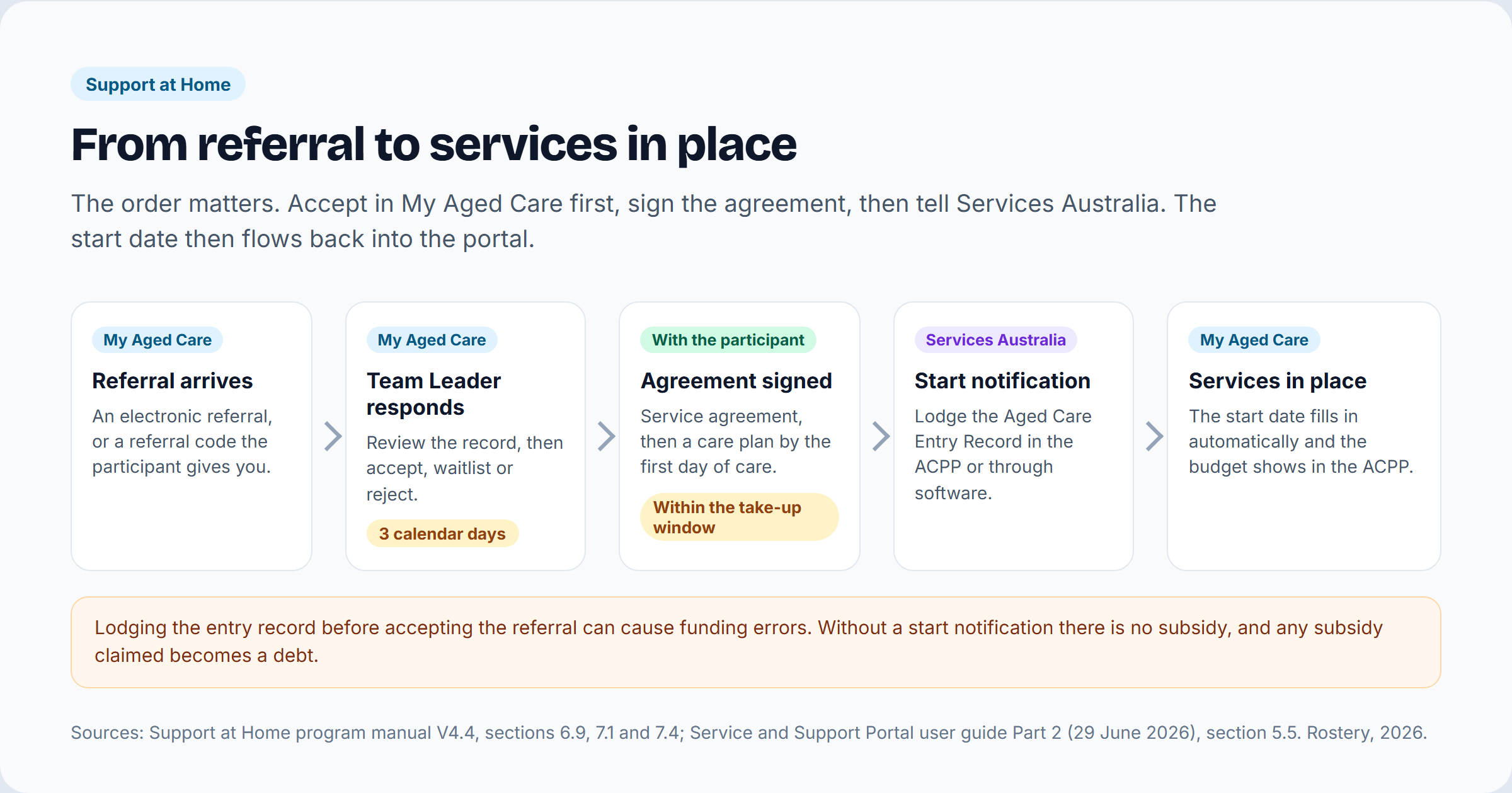
The order matters. For a new Support at Home participant:
- Accept the referral in the My Aged Care portal.
- Sign a service agreement with the participant, and write the care plan with them before or on the first day of care.
- Lodge the start notification with Services Australia through the Aged Care Provider Portal or connected software. The manual also calls it an entry notice or Aged Care Entry Record (ACER).
- When Services Australia processes the entry record, the service start date fills in automatically in the My Aged Care portal, and the client moves from Accepted services pending to Services in place.
- The participant's budget becomes visible in the Aged Care Provider Portal, and you claim for services in arrears. Claims for ongoing services are due within 60 days after each quarter ends.
Two mistakes cause most of the trouble here. If you lodge the entry record before accepting the referral, you risk errors in your funding. If no start notification is in effect, you are not paid any subsidy, and any subsidy you claim for that period becomes a debt.
For Support at Home you don't type a start date into the My Aged Care portal, because it comes from Services Australia's records and is read-only. You also can't edit the approved services yourself, because an assessor approves them. To change them, request a Support Plan Review.
Keeping the client record up to date
The client record has 12 tabs: Client Summary, Client Details, Support Network, Referrals for my Organisation, Plans, Attachments, Approvals, Services, My Aged Care interactions, Notes, Tasks and Notifications, and Residential Care. You can add two kinds of notes. Observations can be read by assessors and providers. Notes marked Other can also be read by the client.
Requesting a Support Plan Review
With the participant's consent, you can ask an assessor to review their support plan through the portal. For Support at Home you must attach the current care plan and budget, and the portal won't send the request without them. You can't submit a request while a review is already assigned or an assessment is under way. Where a support plan has no review date, the department expects providers to review the services they deliver at least every 12 months.
AT-HM extensions
Some AT-HM extensions are applied straight away in the portal, without a delegate's approval. A participant on the medium or high assistive technology tier with a progressive condition can be extended by 24 months, to 48 months in total. A participant on the high home modifications tier can be extended by 12 months, to 24 in total, with evidence that the condition is progressing.
Fixing out-of-date records
Since 1 July 2026, if a client record is wrong or no longer applies to your service, you can end the service yourself by entering a Service End Date and a reason for cessation under Services in place. Moving clients or services between your own outlets has been switched off in the portal since 1 November 2025. Organisation Administrators have to email the department at agedcaretransfers@health.gov.au instead.
Exits, deaths and changing providers
When a participant leaves your service, you must tell Services Australia within 28 calendar days of the exit date and finalise your claims within 60 days. Support at Home has no leave arrangements, and you don't report temporary stops. If no services are delivered for four quarters in a row, the participant's funding is reduced to zero and reallocated.
If a participant dies, the exit date is the date of death. Update the portal using the Notify My Aged Care of a death button, and call My Aged Care as well. The client record then becomes read-only, unaccepted referrals are recalled, services end and any assigned Support at Home funding is withdrawn. You can still add notes and attachments for 14 days.
When a participant changes provider, they reactivate their referral code through their My Aged Care Online Account or by calling 1800 200 422, and their approval and budget move with them. The new provider must accept the referral in the portal before lodging its entry notification, and its start date must be on or after the exit date with the old provider. The old provider must send the new one any records it asks for within 28 days of the request, and the participant's remaining quarterly and AT-HM budget amounts within 28 days of the exit date.
SIRS notices in the portal
Serious incidents are reported to the Aged Care Quality and Safety Commission, but you lodge the notice through the SIRS notification webform in the My Aged Care portal. The user needs the SIRS role on their profile. Priority 1 incidents must be reported within 24 hours of becoming aware of them, and Priority 2 incidents within 30 days. The Commission's SIRS line is 1800 081 549. Our guide to SIRS reporting criteria for Priority 1 and 2 explains how to decide which applies.
Can software connect to the My Aged Care portal?
Partly. The department's business-to-government (B2G) gateway lists eight APIs, four of them My Aged Care client APIs: Client Management, Referral Management, Support Plans and Assessment. They let authorised providers read client, referral, support plan and assessment information, and the department's B2G page says referral and support plan data is available after the referral is accepted. Software has to pass a conformance assessment by the Australian Digital Health Agency before it can connect. The client API specifications were released to software vendors on 29 June 2026, and the department's roadmap lists production access and conformance profiles as later steps. Accepting referrals and reporting prices are still done in the portal itself, and the new Terms of Use ban scripts and scraping.
Claiming has its own channel. Services Australia keeps a public list of software that is ready to claim through its aged care web services. Rostery's Support at Home software keeps the referral, the Notice of Decision details, the service agreement and the start date in one participant record, reminds your team about the 3-day response and the take-up deadline, and builds claims and monthly statements from the rostered visits. Book a demo to see the intake steps with your own referrals.
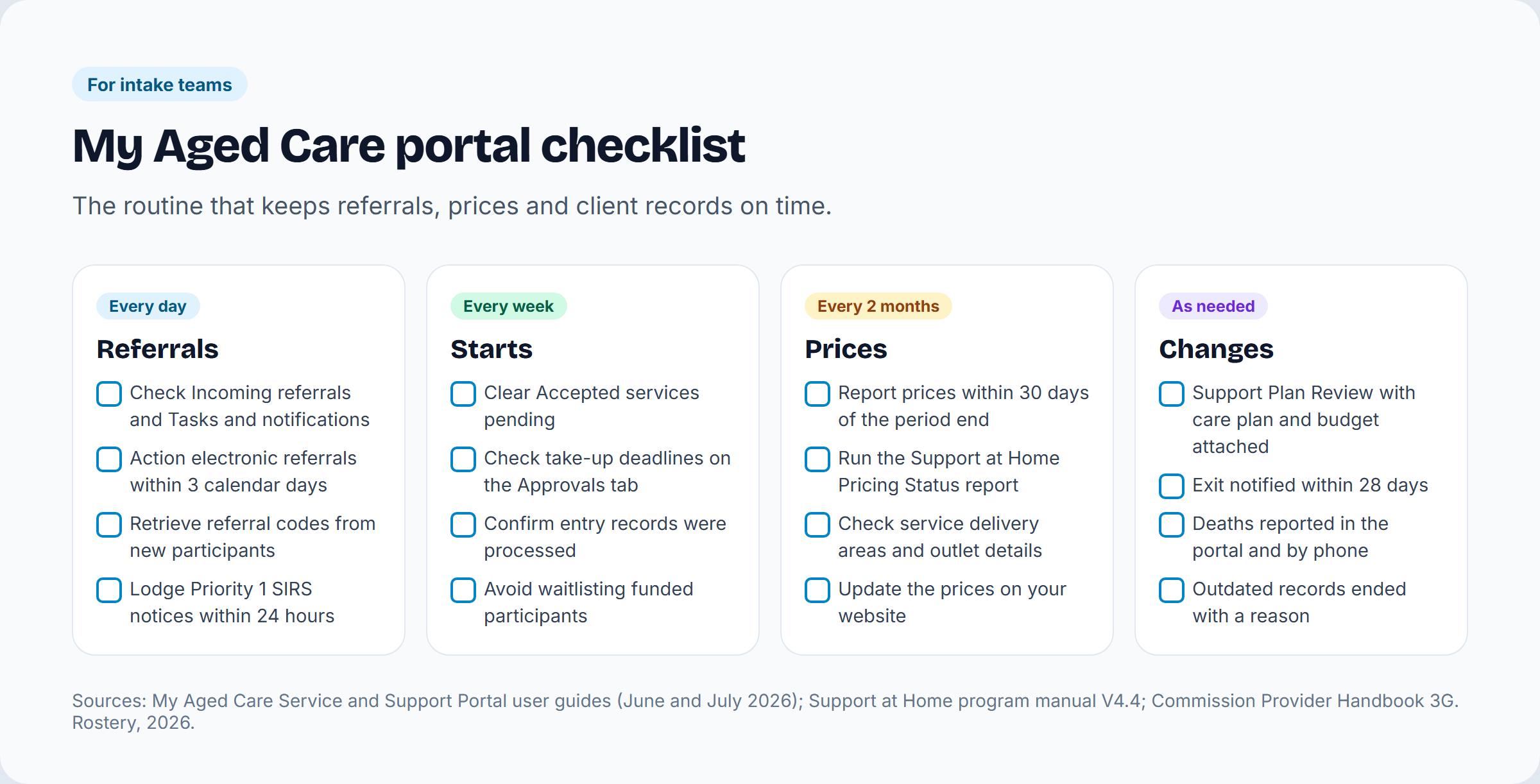
A checklist for intake teams
Every day
- Check Incoming referrals and Tasks and notifications.
- Accept, waitlist or reject electronic referrals within 3 calendar days.
- Retrieve the referral codes new participants give you.
- Lodge any Priority 1 SIRS notice within 24 hours.
Every week
- Work through Accepted services pending and make sure each one has a signed agreement and a lodged entry record.
- Check take-up deadlines on the Approvals tab.
- Avoid waitlisting participants whose funding has been allocated.
Every 2 months
- Report your prices within 30 days of the period ending, or confirm you reviewed them.
- Run the Support at Home Pricing Status report.
- Check service delivery areas and outlet details, and update the prices on your website.
As needed
- Request Support Plan Reviews with the care plan and budget attached.
- Notify exits to Services Australia within 28 days.
- Report deaths in the portal and by phone.
- End out-of-date records with a Service End Date and a reason.
Help and contacts
| Who | Number | Use it for |
|---|---|---|
| My Aged Care service provider and assessor helpline | 1800 836 799 (option 4), 8am to 8pm Monday to Friday, 10am to 2pm Saturday | Portal access, the first Organisation Administrator, technical problems |
| My Aged Care (older people and families) | 1800 200 422 | 28-day extensions, reactivating referral codes, reporting a death |
| Services Australia aged care provider enquiry line | 1800 195 206 | Claims, start notifications and the Aged Care Provider Portal |
| Aged Care Quality and Safety Commission, SIRS | 1800 081 549 | Questions about serious incident notices |
The department keeps every portal user guide in one collection of Service and Support Portal resources. The ones a home care provider uses most are:
- User guide Part 1: Administrator functions (27 July 2026)
- User guide Part 2: Team leader and staff member functions (29 June 2026)
- Manage referrals for service (29 June 2026)
- The client record (29 June 2026)
- Recording and updating client service delivery information (29 June 2026)
- Logging in to the Aged Care Systems (1 November 2025)
Frequently asked questions
What is the My Aged Care provider portal?
It is the department's online system for registered aged care providers, officially the My Aged Care Service and Support Portal. Providers use it to manage outlets and prices, respond to referrals, read client records and Notices of Decision, request Support Plan Reviews and lodge SIRS notices.
How do I log in to the My Aged Care provider portal?
With myID linked to your organisation through Relationship Authorisation Manager, or with VANguard. PRODA is not used for this portal; it is for Services Australia's Aged Care Provider Portal.
How do I become a My Aged Care provider?
Register with the Aged Care Quality and Safety Commission in the right categories (Category 4 with care management for Support at Home, and Category 5 for nursing). Then notify your service delivery branches, ask the helpline for your first Organisation Administrator account, and register for Services Australia's Aged Care Provider Portal.
How long do providers have to respond to a My Aged Care referral?
3 calendar days for an electronic referral, according to the department's June 2026 referrals guide. Overdue referrals trigger flags, emails and tasks in the portal.
How do I use a My Aged Care referral code?
A Team Leader selects Retrieve a referral code, enters the code and chooses the outlet. The referral then appears in Incoming referrals to accept, waitlist or reject.
Where do I find a client's Notice of Decision in the portal?
In the client record, under Attachments. The support plan is under Plans, and the classification, funding and take-up deadline are under Approvals.
Is the My Aged Care portal the same as the Aged Care Provider Portal?
No. The My Aged Care portal belongs to the Department of Health, Disability and Ageing and handles referrals, client records and prices. The Aged Care Provider Portal belongs to Services Australia and handles start notifications, budgets and claims.
How often do I report Support at Home prices?
Every 2 months, within 30 days after each period ends, in the portal. If your prices haven't changed, confirm that you reviewed them.
Sources
- Department of Health, Disability and Ageing: My Aged Care Service and Support Portal (terms of use effective 1 October 2026)
- Set up access to My Aged Care
- My Aged Care Service and Support Portal resources (user guides)
- Support at Home program manual: a guide for registered providers, V4.4 (September 2026)
- Aged Care Rules 2025, sections 155-80 and 166-1005
- Aged Care Quality and Safety Commission: RB 2026-1 Support at Home pricing requirements
- Prices for Support at Home participants
- Aged Care Quality and Safety Commission: becoming a registered provider
- Support at Home transition activities for providers
- Support at Home ongoing services priority categories
- My Aged Care: assessment outcome and wait times
- Services Australia: Aged Care Provider Portal
- Commission Provider Handbook 3G: incident management and SIRS
- Department of Health, Disability and Ageing: B2G gateway
- My Aged Care service provider and assessor helpline
Checked 13 October 2026. The department updates the portal and its guides often, so check the date on the guide you are using. For the program itself, read our complete guide to the Support at Home program, and for a short definition, see the glossary entry on My Aged Care.