Rostery
ComplianceNDIS-Native Compliance & SecurityBank-Grade Security⭐ Core

NDIS Compliance Software for Providers

Each organisation's data walled off in the database, sensitive notes encrypted, sign-in protected, and every change logged.

  • Organisations kept apart
  • Notes encrypted
  • Tax and bank details encrypted
  • Sign-in protected
Compliance requirements tracked per worker and per role

APP 11

Organisations must take reasonable steps to protect personal information from misuse, interference, loss and unauthorised access.

Source: OAIC

Serious harm

If the Privacy Act covers your organisation, you must notify affected people and the OAIC when a data breach is likely to result in serious harm.

Source: OAIC

Essential Eight

Multi-factor authentication is one of the Australian Cyber Security Centre's Essential Eight mitigation strategies.

Source: Australian Cyber Security Centre

What an NDIS provider has to protect

Every one of these would hurt someone if it got out.

Health information

Diagnoses, medications and support needs.

Progress notes

A daily record of a person's life.

Incidents

Reportable incidents and the details around them.

Tax and bank details

Every worker's TFN and account.

Access

Who can see what, and who looked.

Changes

A record of who changed a record, and when.

An NDIS provider holds some of the most sensitive information there is: health details, disability support needs, incidents, bank and tax details. Rostery is built to keep that information apart, protected and accounted for.

How Rostery protects your data

Every organisation's data is kept apart by row-level security in the database, so each request can only reach its own organisation's records. Free-text notes such as progress notes, incident details and shift notes are encrypted with AES-256-GCM before they are stored, and staff tax file numbers and bank details are encrypted in the database, with every view by another person logged.

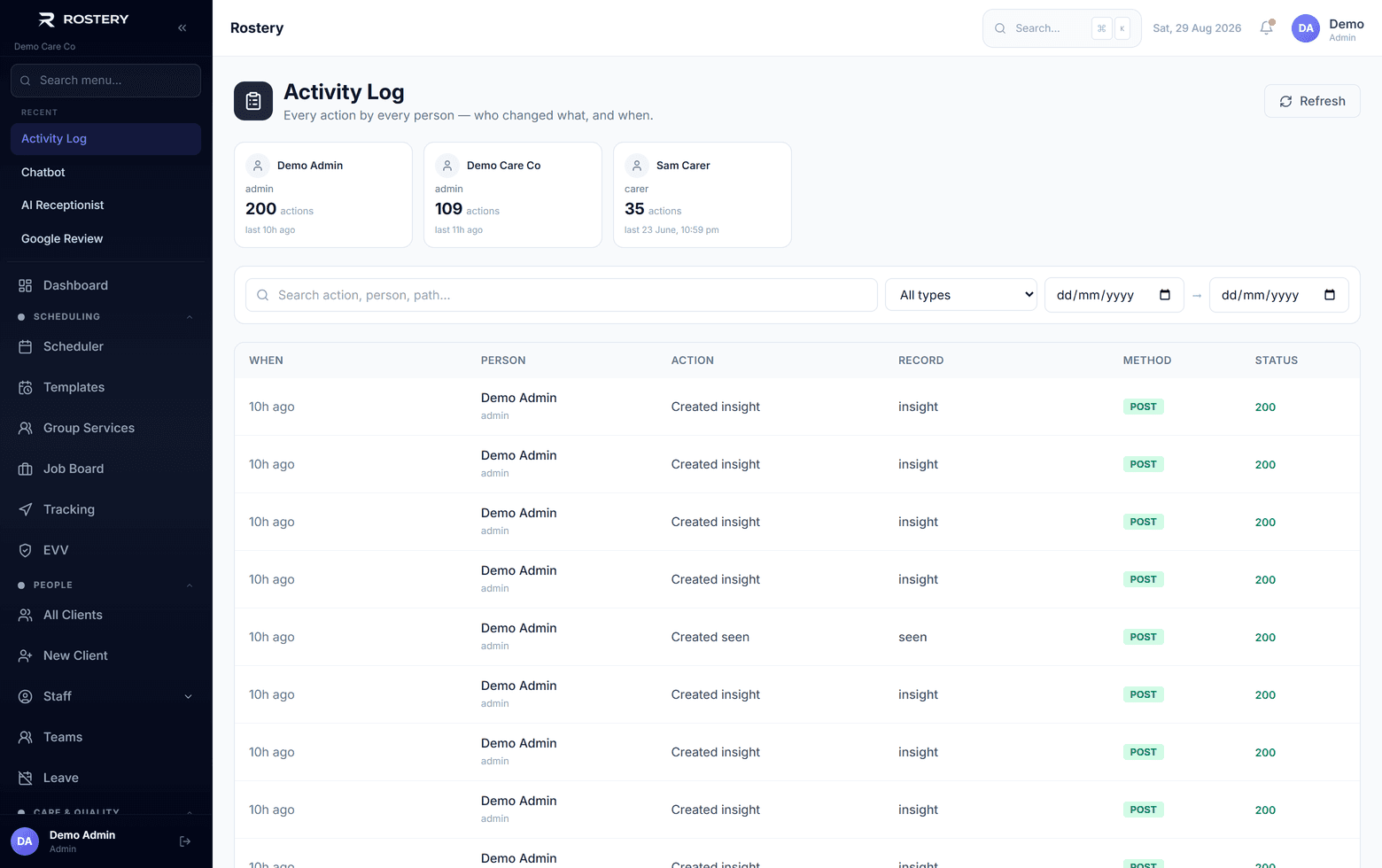
Web sessions use secure, HttpOnly cookies with protection against cross-site request forgery, behind strict security headers. Administrators can turn on two-factor sign-in, accounts lock after repeated failed passwords, and passwords found in known breaches are refused. Every change made in Rostery is written to an activity log with who made it, their role, when and from what network address, which administrators and office staff can search and export. Rostery runs on servers in Sydney.
How Rostery protects it

1

Organisations kept apart

Row-level security in the database means each request can only reach its own organisation's records.

2

Sensitive fields encrypted

Progress notes, incident details and other free-text notes are encrypted with AES-256-GCM before storage. Staff TFNs and bank details are encrypted, and views by another person are logged.

3

Every change logged

The activity log records each change with the person, their role, the time and the network address, with sensitive values left out. Admins and office staff can search and export it.

4

Sign-in protected

Two-factor sign-in, lockout after repeated failed passwords, breached-password checks, secure cookies with CSRF protection and strict security headers.

See NDIS-Native Compliance & Security in action

An audit trail of who did what, and when

Who it matters to

Owners and directors

Know where data is kept and how it is protected.

Quality and compliance

Show an auditor who changed what, and when.

Participants

Their notes and details are encrypted and kept to your organisation.

What a privacy review may ask

Rostery covers the system controls. The rest are your own policies.

  • Each person's access matches their role
  • Administrators use two-factor sign-in
  • You can show who changed a record and when
  • Reportable incidents are notified within the timeframes
  • Access is removed promptly when staff leave
  • You have a written data breach response plan

The rule behind it

Under Australian Privacy Principle 11, organisations covered by the Privacy Act must take reasonable steps to protect personal information from misuse, interference, loss and unauthorised access. Isolation, encryption, protected sign-in and an activity log are the system side of those steps.

APP 11: security of personal information (OAIC)

Tighten security in four steps

  1. 1

    Set roles

    Give each person the role that matches their job.

  2. 2

    Turn on two-factor sign-in

    Settings, then Security & MFA, for administrators.

  3. 3

    Review the activity log

    Check changes regularly, and export what you need.

  4. 4

    Keep your own copy

    Use the data export for your records.

See NDIS-Native Compliance & Security on your own data

A guided demo with your participants, staff and price book. No obligation.

Book a Demo

NDIS-Native Compliance & Security: questions

On servers in Sydney, Australia.

Ready when you are

Ready to transform your NDIS operations?

See Rostery running on your own rosters, funding and award rules — not a canned tour.

Guided walkthroughYour own dataNo obligation

No setup fees · No obligation · Australian data storage