Rostery
HRLeave Management

NDIS Leave Management: Requests & Shift Cover

Leave requests from the Rostery app, the affected shifts shown before you approve, and those shifts freed for cover the moment you do.

  • Requests from the app
  • Shift impact before approval
  • Shifts freed automatically
  • Leave shown on the roster
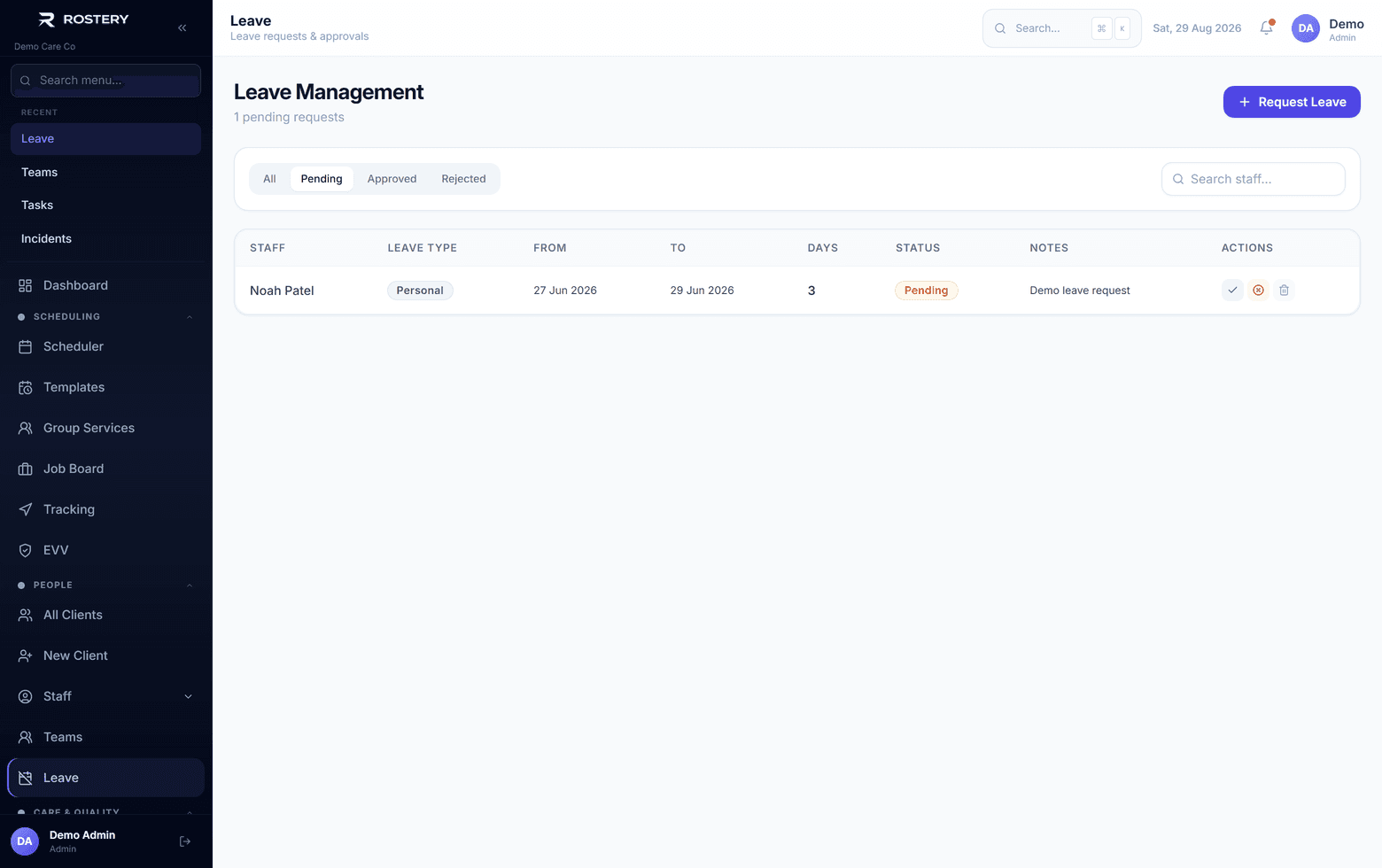
Leave requested, approved and reflected on the roster

4 weeks

Full-time and part-time employees get 4 weeks of annual leave a year, based on their ordinary hours.

Source: Fair Work Ombudsman

10 days

Full-time employees get 10 days of paid sick and carer's leave a year, and part-time employees get it pro rata.

Source: Fair Work Ombudsman

7 years

Employee records, including leave records, must be kept for 7 years.

Source: Fair Work Ombudsman

What one leave request sets off

Approving leave is the easy part. The work is in everything around it.

The request

It arrives by text, email or a word in the hallway, and has to be written down somewhere.

The decision

A manager needs the dates, the type and what else is happening that week.

The shifts affected

Someone has to work out which shifts the worker was rostered on.

Finding cover

Each of those shifts needs another worker, ideally one the participant knows.

Telling the worker

The worker needs a clear yes or no, and a reason if it's no.

Keeping the record

Leave records are employee records, and they have to be kept.

Leave is where rosters break. A worker books annual leave, the request sits in someone's inbox, and three weeks later nobody remembers that the Tuesday shifts need cover. Rostery ties leave to the roster. Requests come in from the app, managers see the shifts affected before approving, and approval frees those shifts for someone else.

How NDIS leave management works in Rostery

A support worker opens Leave in the Rostery app, picks the type (annual, sick, personal or other), the dates and a reason, and submits. If the worker has a manager set, the manager gets an email. Office staff can also record leave for anyone on the web, with nine leave types including carer's, parental, long service and unpaid leave.

Before approving, the reviewer sees how many shifts the leave affects and which ones. On approval, Rostery takes the worker off each of those shifts, sets them back to unfilled, and posts the published ones to the Job Board so other workers can pick them up. The worker is emailed the decision, with the reason if it was declined.

How Rostery handles leave

1

Requests from the app

Workers submit annual, sick, personal or other leave with dates and a reason, and can delete a request while it is still pending. The office can record nine leave types for anyone on the web.

2

See the impact first

Before you approve, Rostery shows how many of the worker's shifts fall in the leave dates, and which ones.

3

Shifts freed on approval

Approval takes the worker off every affected shift, sets it back to unfilled and posts published shifts to the Job Board for other workers to claim.

4

Leave on the roster

Approved leave shows as a stripe on the staff grid. Assigning someone who is on leave raises a warning, and Find cover in the app moves workers on leave to the bottom of the list.

Who uses it

Support workers

Request leave in the Rostery app, see whether it is pending, approved or declined, and get the decision by email.

Managers

Get an email when someone they manage asks for leave, and approve or decline on the web or in the app, with a reason.

Rostering team

Find the freed shifts unfilled on the roster and on the Job Board, ready to cover.

What to keep for every leave request

Leave records are employee records under the Fair Work Act, and an inspector can ask to see them.

  • The type of leave and the dates taken
  • When it was requested and whether it was approved
  • The reason, if it was declined
  • Which shifts were affected and who covered them
  • All of it kept for 7 years

The rule behind it

The National Employment Standards set minimum leave for most employees: 4 weeks of annual leave a year for full-time and part-time staff (more for shiftworkers where their award provides it), and 10 days of paid sick and carer's leave for full-time staff, pro rata for part-time staff. Casual employees don't get paid annual or sick leave.

National Employment Standards (Fair Work Ombudsman)

Set up leave in four steps

  1. 1

    Get workers on the app

    Leave requests come from the Leave screen in the Rostery app.

  2. 2

    Set each worker's manager

    Managers are emailed when someone they manage asks for leave.

  3. 3

    Review requests

    Open Leave on the web, check the shifts affected and decide.

  4. 4

    Cover the freed shifts

    Fill them from the roster or let workers claim them on the Job Board.

See Leave Management on your own data

A guided demo with your participants, staff and price book. No obligation.

Book a Demo

Leave Management: questions

In the Rostery app. They open Leave, choose the type, the dates and a reason, and submit. They can delete the request while it is still pending.

Ready when you are

Ready to transform your NDIS operations?

See Rostery running on your own rosters, funding and award rules โ€” not a canned tour.

Guided walkthroughYour own dataNo obligation

No setup fees ยท No obligation ยท Australian data storage